AS-IS
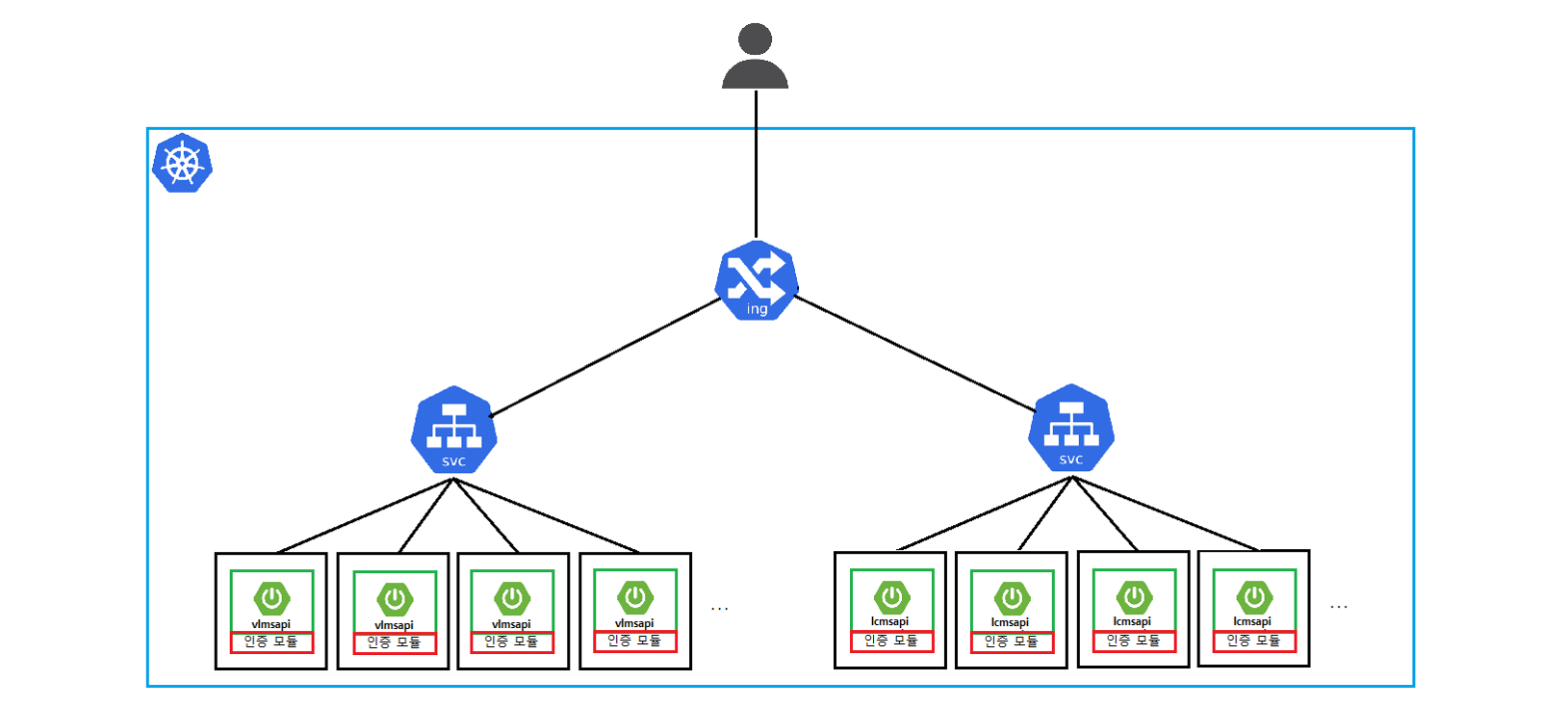
TO-BE
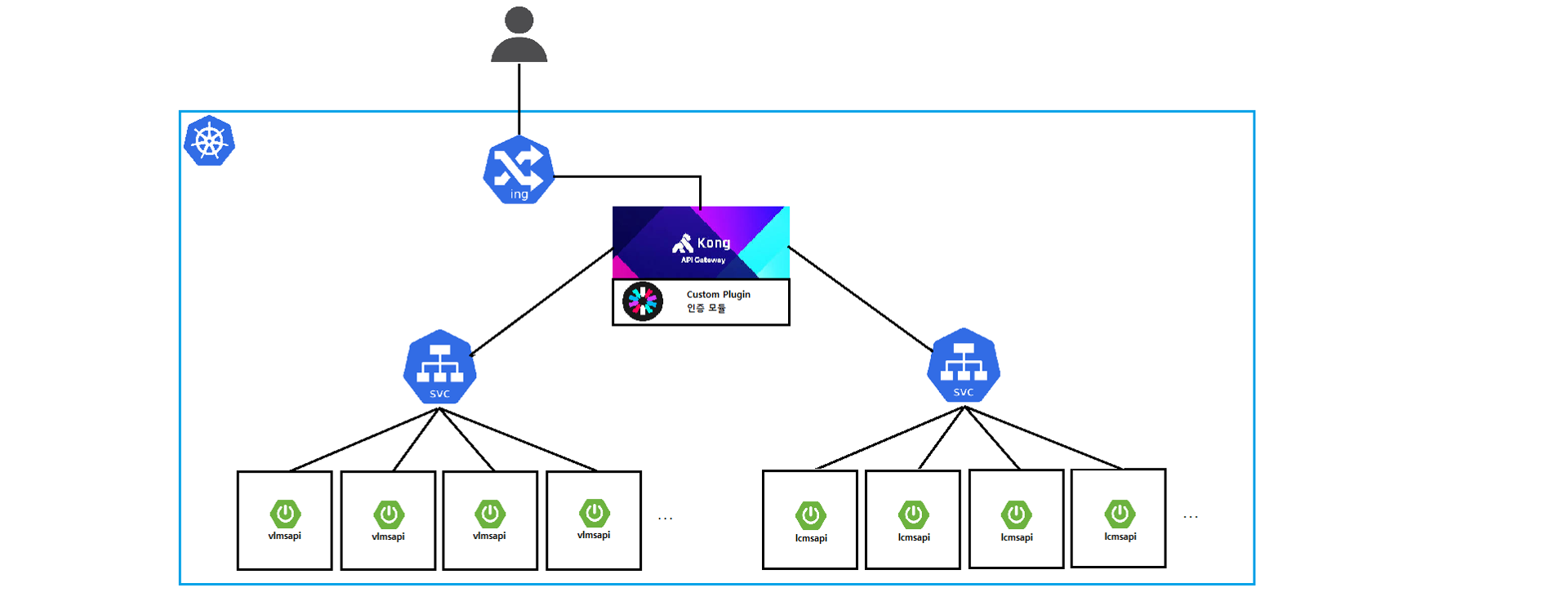
하단 Document를 참고하여 개발 및 구성을 진행하였다.
Custom plugins | Kong Docs
플러그인 적용을 위해서는 handler.lua, schema.lua 두 가지 필수 파일이 있다.
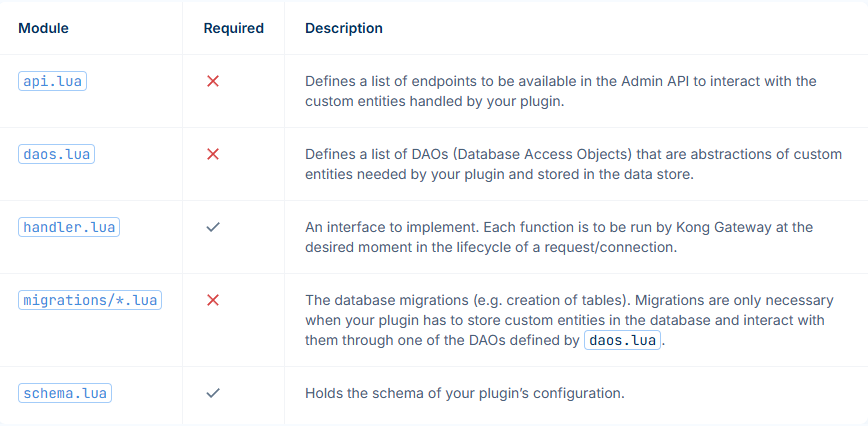
Schema.lua
- 플러그인의 설정 필드 구조를 정의
- PostgreSQL, Cassandra 등에 저장될 config 구조를 검증하는 역할
local typedefs = require "kong.db.schema.typedefs"
return {
  name = "whitelist",
  fields = {
    { config = {
        type = "record",
        fields = {
          { whitelist = {
              type = "array",
              elements = { type = "string" },
              default = {},
              description = "Paths to whitelist and skip JWT validation",
            },
          },
          { skip_hmac = {
              type = "boolean",
              default = false,
              description = "Skip HMAC verification when true",
            },
          },
        },
      },
    },
  },
}
PostgreSQL 데이터 조회
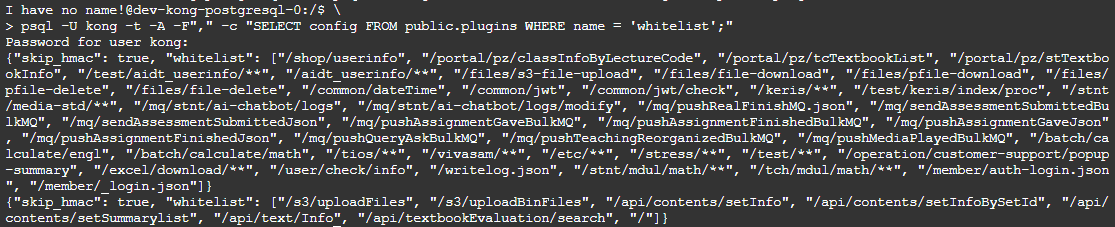
Handler.lua
- 기존 인증 모듈 로직을 포함 (whitelist, jwt 검증, hmac검증)
- 추가적으로 DB연동 테스트 포함하여 컬럼 값 검증
-- jwt 플러그인의 파일 reference
package.path = package.path .. ";/usr/local/share/lua/5.1/kong/plugins/jwt/?.lua"
local kong = kong
local jwt_parser = require "jwt_parser"
local json = require "cjson"
local hmac = require "resty.hmac"
local cjson = require "cjson.safe"
local mysql = require "resty.mysql"
local ngx = ngx

local WhitelistPlugin = {
  PRIORITY = 1000,
  VERSION = "1.0",
}

-- 설정 상수
local SECRET = "tempsecret"
local JWT_SUBJECT = "test_jwt_sub"

local function calculate_hmac(secret, timestamp, id, jwt_token)
  local data = timestamp .. id .. jwt_token
  local hmac_obj = hmac:new(secret, hmac.ALGOS.SHA256)
  hmac_obj:update(data)
  local digest = hmac_obj:final()
  return b64.encode_base64(digest)
end

-- 변환 함수: Java-style glob to Lua pattern
local function glob_to_lua_pattern(glob)
  -- 이스케이프 처리
  local pattern = glob:gsub("([%^%$%(%)%%%.%[%]%+%-%?])", "%%%1")

   pattern = pattern:gsub("%*%*", "___DOUBLE_WILDCARD___")
   pattern = pattern:gsub("%*", "[^/]*")
   pattern = pattern:gsub("%?", ".")

   pattern = pattern:gsub("___DOUBLE_WILDCARD___", ".*")

  -- 전체 문자열 매칭을 위해 anchor 추가
  pattern = "^" .. pattern .. "$"

  return pattern
end

function WhitelistPlugin:access(conf)
  -- router의 prefix를 동적으로 가져와 원본 Path로 변환
  local path = kong.request.get_path()
  local route = kong.router.get_route()
  local prefix = nil
  if route and route.paths and #route.paths > 0 then
    prefix = route.paths[1]
    kong.log.info("[whitelist] 첫번째 prefix: ", prefix)
  end

  kong.log.info("[whitelist] 원본 호출 경로: ", path)

  if prefix ~= "" and path:sub(1, #prefix) == prefix then
    path = path:sub(#prefix + 1)
    if path == "" then path = "/" end
  end

  kong.log.info("[whitelist] prefix 제거 후 경로: ", path)

  -- 화이트리스트 검증
  -- conf.whitelist를 통해 PostgreSQL에 저장되어 있는 데이터를 전달 받음
  for _, allowed_pattern in ipairs(conf.whitelist or {}) do
    kong.log.info("[whitelist] 검사 중인 whitelist 경로: ", allowed_pattern)
    local lua_pattern = glob_to_lua_pattern(allowed_pattern)
    kong.log.info("[whitelist] Lua 스타일로 변환된 whitelist 경로: ", lua_pattern)

    if path:match(lua_pattern) then
      kong.log.info("[whitelist] 화이트리스트에 매칭되어 JWT/HMAC 생략: ", path)
      kong.service.request.set_header("visang", true)
      return
    end
  end

  -- Authorization 헤더 추출
  local auth_header = kong.request.get_header("authorization")
  if not auth_header then
    kong.log.info("[whitelist] Authorization 헤더 없음")
    return kong.response.exit(401, { message = "Missing Authorization header" })
  end

  local token = auth_header:match("Bearer%s+(.+)")
  if not token then
    kong.log.info("[whitelist] Authorization 포맷 오류")
    return kong.response.exit(401, { message = "Invalid Authorization header format" })
  end

  kong.log.info("[whitelist] JWT 토큰 추출 성공. 검증 시작...")

  -- JWT 검증
  -- LUA의 대표적인 JWT 라이브러리에서 HS384 Algorithm을 지원하지 않음
  -- Kong JWT Plugin의 jwt_parser를 활용하여 토큰 검증
  -- 256, 384, 512 지원
  local jwt_instance, err = jwt_parser:new(token)
  if not jwt_instance then
    kong.log.info("[whitelist] jwt instance failed")
    return kong.response.exit(401, { message = " jwt instance failed"})
  end

  local verified = jwt_instance:verify_signature(SECRET)
  if not verified then
    kong.log.info("[whitelist] signature verification failed")
    return kong.response.exit(401, { message = "signature verification failed"})
  end

  local claims = jwt_instance.claims
  local subject = claims["sub"]
  local claId = claims["claId"]
  local userSeCd = claims["userSeCd"]
  local timestamp = claims["timestamp"]
  local exp = claims["exp"]
  local id = claims["id"]

  kong.log.info("[whitelist] JWT 클레임 - sub: ", subject, ", timestamp: ", timestamp, ", id: ", id)

  -- HMAC 검증
  -- PostgreSQL에 저장된 conf.skip_hmac의 값을 전달 받아 로직 수행
  if not conf.skip_hmac then
    kong.log.info("[whitelist] HMAC 검증 시작")
    local hmac_header = kong.request.get_header("HMAC")
    if not hmac_header then
      kong.log.info("[whitelist] HMAC 헤더 없음")
      return kong.response.exit(401, { message = "Missing HMAC header" })
    end

    local h = hmac:new(SECRET, hmac.ALGOS.SHA256)
    h:update(timestamp .. id .. token)
    local calculated_hmac = ngx.encode_base64(h:final(nil, true))

    kong.log.info("[whitelist] 계산된 HMAC: ", calculated_hmac)
    kong.log.info("[whitelist] 요청 헤더의 HMAC: ", hmac_header)

    if calculated_hmac ~= hmac_header then
      kong.log.info("[whitelist] HMAC 불일치")
      return kong.response.exit(401, { message = "HMAC validation failed" })
    end
  else
    kong.log.info("[whitelist] HMAC 검증 생략됨")
  end

  -- exp 검증
  local ngx_time = ngx.time
  local function is_expired(exp)
    if type(exp) ~= "number" then
      return true, "exp claim missing or invalid"
    end

    if exp <= ngx_time() then
      return true, "token expired"
    end

    return false, nil
  end

  local expired, err = is_expired(exp)
  if expired then
    kong.log.err("JWT expired: ", err)
    return kong.response.exit(401, { message = "JWT expired" })
  end

  -- db 연동
  local db, err = mysql:new()
  db:set_timeout(1000)
  db:set_keepalive(10000, 100)
  local ok, err, errno, sqlstate = db:connect{
      host = "db-358j8.vpc-cdb-krs.gov-ntruss.com",
      port = 3306,
      database = "aidt_lms",
      user = "vsncp2service",
      password = "Qltkdelql!12"
  }

  if not ok then
    kong.log.err("failed to connect: ", err)
    return kong.response.exit(500, { message = "DB connection failed" })
  end

  -- userSeCd 검증
  local sql = string.format("SELECT user_se_cd FROM user WHERE user_id = %s", ngx.quote_sql_str(id))
  local res, err, errno, sqlstate = db:query(sql)
  if not res then
      kong.log.info("[whitelist] Bad result: ", err, ": ", errno, ": ", sqlstate, ".")
      return kong.response.exit(401, { message = "Bad result"})
  end

  if not res[1] or not res[1].user_se_cd then
    kong.log.info("[whitelist] No userSeCd found in DB for user")
    return kong.response.exit(401, { message = "No userSeCd found for user" })
  end

  local db_userSeCd = res[1].user_se_cd

  if userSeCd ~= db_userSeCd then
    kong.log.info("[whitelist] JWT userSeCd mismatch: ", userSeCd)
    return kong.response.exit(401, { message = "JWT userSeCd mismatch: " .. tostring(userSeCd) })
  end

  local field = nil
  if userSeCd == "t" or userSeCd == "T" then
    field = "user_id"
  else
    field = "stdt_id"
  end

  -- claId 검증
  local sql = string.format("SELECT cla_id FROM tc_cla_mb_info WHERE %s = %s GROUP BY cla_id",field ,ngx.quote_sql_str(id))
  local res, err, errno, sqlstate = db:query(sql)
  if not res then
      kong.log.info("[whitelist] Bad result: ", err, ": ", errno, ": ", sqlstate, ".")
      return kong.response.exit(401, { message = "Bad result"})
  end

  if not res[1] or not res[1].cla_id then
    kong.log.info("[whitelist] No claId found in DB for user")
    return kong.response.exit(401, { message = "No claId found for user" })
  end

  -- DB에서 조회된 모든 cla_id 중에 JWT의 claId가 있는지 확인
  -- 선생님의 경우 cla_id가 1:N
  local claId_found = false
  for _, row in ipairs(res) do
    if row.cla_id == claId then
      claId_found = true
      break
    end
  end

  if not claId_found then
    kong.log.info("[whitelist] JWT claId mismatch: ", claId)
    return kong.response.exit(401, { message = "JWT claId mismatch: " .. tostring(claId) })
  end


  if not timestamp then
    kong.log.info("[whitelist] timestamp 클레임 누락")
    return kong.response.exit(401, { message = "Missing 'timestamp' in JWT" })
  end

  if not id then
    kong.log.info("[whitelist] id 클레임 누락")
    return kong.response.exit(401, { message = "Missing 'id' in JWT" })
  end

  kong.log.info("[whitelist] 모든 인증 절차 성공")
  kong.service.request.set_header("visang", true)
end


return WhitelistPlugin
Kong에 plugin 추가 작업
/usr/local/share/lua/5.1/kong/plugins 가 plugin들이 모여있는 directory

현재 Kong은 Helm으로 구성 되어 있고, Helm을 기반으로 파일을 옮겨주고 설정을 커스텀해 주어야함.
플러그인 추가 과정
- 소스 코드 관리를 위해 파일 생성
- 플러그인 파일 복사를 위한 configmap 생성
더보기values-override.yaml
kong: deployment: kong: enabled: true serviceAccount: create: true userDefinedVolumes: - name: whitelist-plugin configMap: name: whitelist-plugin-config - name: writable-whitelist emptyDir: { } userDefinedVolumeMounts: - name: writable-whitelist mountPath: /usr/local/share/lua/5.1/kong/plugins/whitelist initContainers: - name: chown-whitelist-plugin image: alpine:3.18 command: - sh - '-c' - | mkdir -p /writable cp -rL /readonly/* /writable chown -R 1001:1001 /writable find /writable -type d -exec chmod 775 {} \; find /writable -type f -exec chmod 775 {} \; volumeMounts: - name: whitelist-plugin mountPath: /readonly readOnly: true - name: writable-whitelist mountPath: /writable env: plugins: 'bundled,whitelist' log_level: "debug" nginx_worker_processes: "2" anonymous_reports: "off" database: "postgres" proxy_listen: "0.0.0.0:8000" admin_listen: "0.0.0.0:8001" status_listen: "0.0.0.0:8100" admin_gui_url: http://t-gwg.aidtclass.com/manager #http://gwg.aibookclass.com/manager # Kong Manager UI가 외부에서 접근되는 도메인 admin_gui_path: /manager admin_api_uri: http://t-gwg.aidtclass.com # Admin API도 ALB 통해 80으로 접근 admin: enabled: true type: NodePort #LoadBalancer annotations: alb.ingress.kubernetes.io/healthcheck-path: "/status" # service.beta.kubernetes.io/ncloud-load-balancer-internal: "true" # LoadBalancer Type일꼉우 private subnet http: enabled: true servicePort: 8001 containerPort: 8001 # Set a nodePort which is available if service type is NodePort # nodePort: 32080 # Additional listen parameters, e.g. "reuseport", "backlog=16384" parameters: [] tls: enabled: false servicePort: 8444 #default port #default port 8444 containerPort: 8444 #default port #default port 8444 parameters: [] manager: type: NodePort #LoadBalancer annotations: alb.ingress.kubernetes.io/healthcheck-path: "/manager" # service.beta.kubernetes.io/ncloud-load-balancer-internal: "true" http: servicePort: 8002 #default port 8002 containerPort: 8002 tls: enabled: false servicePort: 443 #default port 8445 containerPort: 8445 parameters: [] # ingress: # # Enable/disable exposure using ingress. # enabled: true # ingressClassName: alb # # TLS secret name. # # tls: kong-manager.example.com-tls # # Ingress hostname # hostname: gwg.aibookclass.com # # Map of ingress annotations. # annotations: # alb.ingress.kubernetes.io/description: BETA-2E ENGL KONG ALB # alb.ingress.kubernetes.io/idle-timeout: '600' # alb.ingress.kubernetes.io/listen-ports: '[{"HTTP": 80},{"HTTPS":443}]' # alb.ingress.kubernetes.io/network-type: private # alb.ingress.kubernetes.io/ssl-certificate-no: '20826' # alb.ingress.kubernetes.io/ssl-min-version: TLSV12 # # Ingress path. # path: /* # # Each path in an Ingress is required to have a corresponding path type. (ImplementationSpecific/Exact/Prefix) # pathType: ImplementationSpecific proxy: enabled: true type: NodePort #LoadBalancer annotations: alb.ingress.kubernetes.io/healthcheck-path: "/api/log-nginx/healthcheck" # service.beta.kubernetes.io/ncloud-load-balancer-ssl-certificate-no: "18031" # service.beta.kubernetes.io/ncloud-load-balancer-proxy-protocol: true #프록시 프로토콜 활성화 여부 labels: enable-metrics: "true" http: enabled: true parameters: [] tls: enabled: false parameters: [] ingressController: enabled: true args: - --anonymous-reports=false admissionWebhook: enabled: false ingressClass: kong ingressClassAnnotations: {} rbac: create: true env: kong_admin_url: http://localhost:8001 postgresql: enabled: true #true면 내장, false 외장 auth: password: kong postgresPassword: kongpassword cluster: enabled: false - initContainer 작업
파일 타입 및 권한 & 소유자 및 소유자 그룹 변경 (권한 이슈로 플러그인 인식 불가)
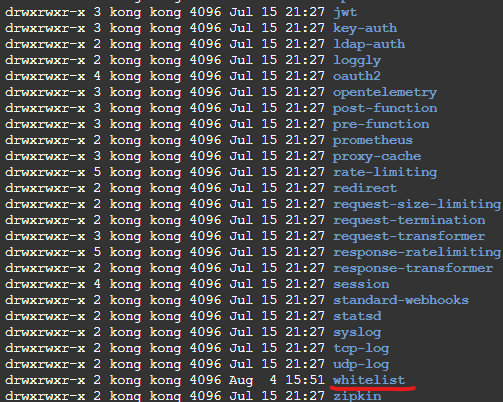

플러그인 인식 위치로 파일 복사
initContainers:
      - name: chown-whitelist-plugin
        image: alpine:3.18
        command:
          - sh
          - '-c'
          - |
            mkdir -p /writable
            cp -rL /readonly/* /writable
            chown -R 1001:1001 /writable
            find /writable -type d -exec chmod 775 {} \;
            find /writable -type f -exec chmod 775 {} \;
        volumeMounts:
          - name: whitelist-plugin
            mountPath: /readonly
            readOnly: true
          - name: writable-whitelist
            mountPath: /writable
        ...
        volumeMounts:
          - mountPath: /usr/local/share/lua/5.1/kong/plugins/whitelist
            name: writable-whitelist
4. 환경 변수에 추가 플러그인의 이름 추가
(bundled는 default 플러그인을 의미함)
- env:
    - name: KONG_PLUGINS
      value: 'bundled,whitelist'
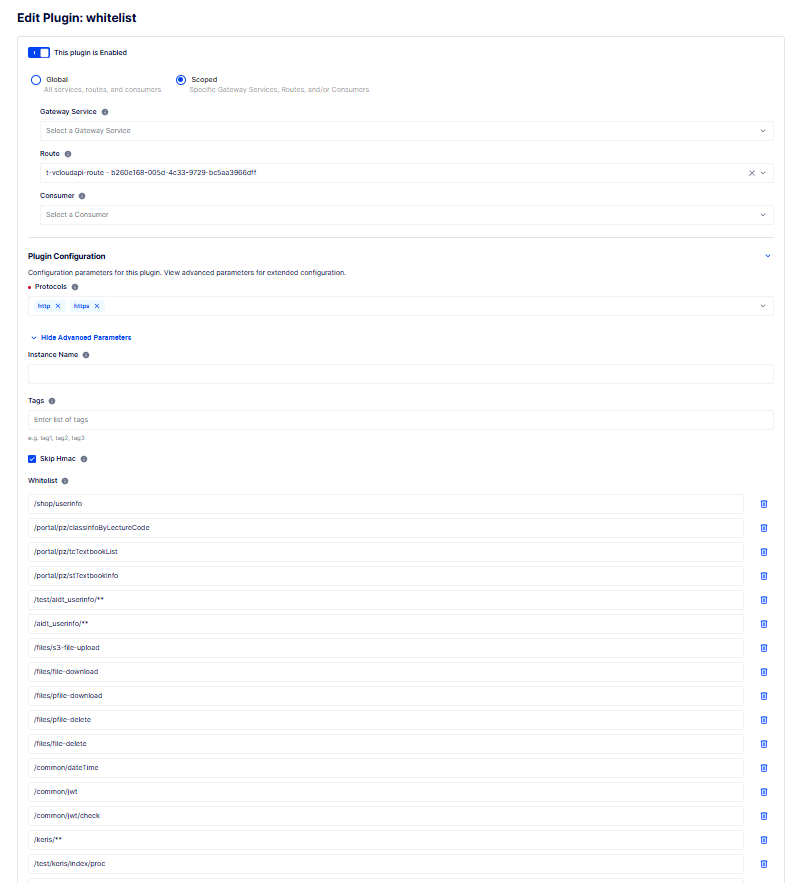
플러그인 적용 확인
댓글